 EazyPrint
HP LaserJet M1005 on Android: print over USB OTG
The HP LaserJet M1005 is the printer EazyPrint has been tested on. This guide covers what you need, the settings, and what is tested and what is still pending.
By EazyLife Tech Solutions, the independent developer of EazyPrint for Android (com.eazyprint). Updated
The short answer
- The M1005 cannot read a PDF on its own. EazyPrint converts the pages into the printer’s XQX protocol and sends them over USB.
- You need a phone with USB OTG support and an OTG cable. No computer or Wi-Fi is needed.
- Tested on real hardware: printing to the M1005 MFP (USB ID 03f0:3b17).
- Pending a hardware check: two copies, landscape, and Odd/Even pages.
- The new print screens (progress, Cancel, copies, landscape, Odd/Even, Word and Excel) are built and are going through checks on the M1005; the first tester build will say what has been confirmed.
What you need
- An Android phone with USB host (OTG) support, on Android 6.0 or later.
- A USB OTG cable or adapter, and the printer’s USB cable.
- EazyPrint. It is not on Google Play yet, so see the early access note below.
How to print
- Switch the M1005 on and load paper.
- Connect the printer to the phone through the OTG adapter.
- Open EazyPrint and allow USB access when Android asks.
- Tap Print and pick a PDF, Word or Excel file.
- Choose pages on the Pages step, then set the options and print.
How EazyPrint recognises it
EazyPrint matches the printer by its USB ID. The driver list has three M1005 entries, all using the XQX protocol.
| Model | USB ID | Status |
|---|---|---|
| HP LaserJet M1005 MFP | 03f0:3b17 | Tested |
| HP LaserJet M1005 | 03f0:251a | Experimental |
| HP LaserJet M1005 | 03f0:1017 | Experimental |
The hardware test was on the M1005 MFP. The two other USB IDs use the same driver but are marked experimental because they have not been tried on those exact units.
Settings you can change
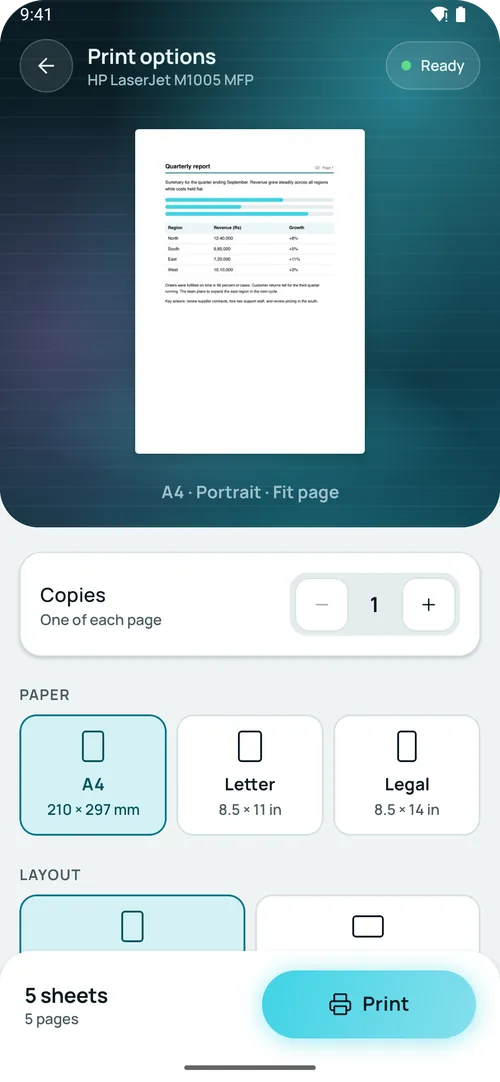
EazyPrint offers copies, paper size (A4, Letter, Legal), portrait or landscape, fit (Fit page, Actual size, Fill paper) and margins (Normal, Narrow, None). On the Pages step you can print all pages, Odd pages, Even pages or a range.
Tested and pending
| What | Status |
|---|---|
| Printing a document to the M1005 MFP | Tested |
| Two copies | Pending hardware check |
| Landscape | Pending hardware check |
| Odd and Even pages | Pending hardware check |
These options exist in the app, but we have not confirmed them on the printer yet. If you try one, tell us how it went (see the supported printers page).
What it does not do
- EazyPrint is not on Google Play yet. Testers get a build by email.
- Only the printing above is tested. Copies, landscape and Odd/Even are pending a hardware check.
- It prints over a USB cable. There is no Wi-Fi or cloud printing.
- The options screen has no colour or two-sided setting. It offers copies, paper size, orientation, fit and margins.
- EazyPrint does not make the printer faster or change its print quality. We have no speed or page-cost figures.
How to get EazyPrint
EazyPrint is not on Google Play yet. To get early access, email srv021@gmail.com and say which printer you have.
Questions
Does EazyPrint work with the HP LaserJet M1005?
Yes. It is the one printer tested on real hardware, the M1005 MFP with USB ID 03f0:3b17. Two copies, landscape and Odd/Even pages are still waiting for a hardware check.
Do I need a computer or Wi-Fi to print to an M1005 from Android?
No. You need a USB OTG cable. EazyPrint sends the pages over USB.
Why can’t Android print to the M1005 on its own?
The M1005 cannot read PDF files. It needs the page converted into its own protocol, which EazyPrint does.
Does it work with other HP LaserJet models?
Some are listed as experimental. The protocol is built, but it has not been tested on those models.