 EazyPrint
How to print Word and Excel files from Android offline
EazyPrint can open Word (.docx) and Excel (.xls, .xlsx) files, turn them into a PDF on the phone, and print that PDF over USB. The conversion is simple, so check the preview before you print.
By EazyLife Tech Solutions, the independent developer of EazyPrint for Android (com.eazyprint). Updated
The short answer
- In EazyPrint tap Print and pick a .docx, .xls or .xlsx file. The app converts it to a PDF on the phone and keeps going to the Pages step.
- The conversion is offline and simplified. It is not Word’s or Excel’s own layout.
- For Excel, only the first sheet is converted.
- Old .doc files are not offered by the file picker. Save them as .docx or PDF first.
How to do it
- Connect the printer with a USB OTG cable and allow USB access when Android asks.
- In EazyPrint, tap Print and pick your Word or Excel file.
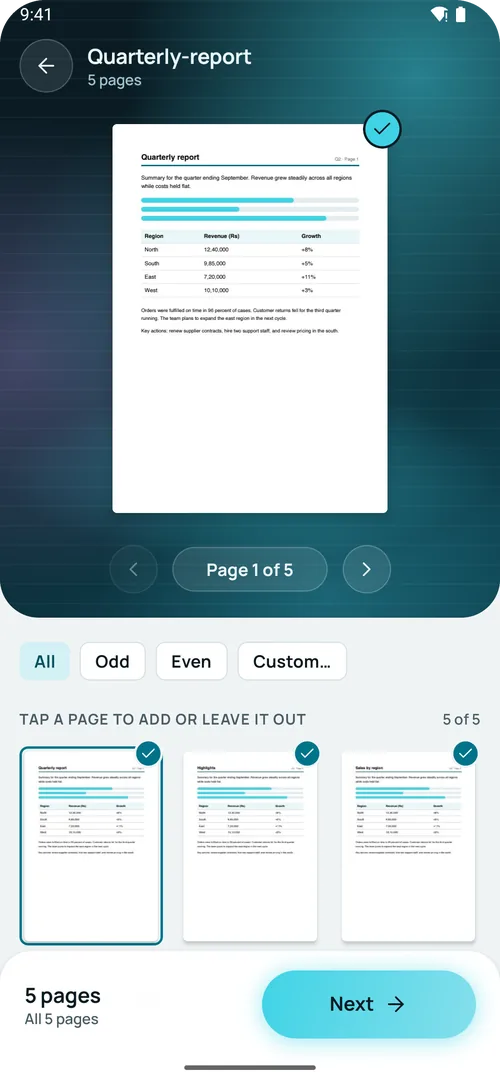
- Wait while it converts. The app shows a converting step, then the Pages step with a thumbnail of every page.
- Look at the thumbnails. If the layout is wrong, save the file as a PDF in Word or Excel and use the PDF instead.
- Choose pages, set the options and print.
How the conversion works
For a Word file, the text, headings, tables and images are turned into a simple page. For an Excel file, the first sheet is turned into a table with the sheet name as a heading. The result is saved as an A4 PDF on the phone. Nothing is uploaded.
| File type | Picker | Notes |
|---|---|---|
| .docx (Word) | Offered | Converted to PDF on the phone, simplified layout |
| .xlsx, .xls (Excel) | Offered | First sheet only, shown as a table |
| .doc (old Word) | Not offered | Save as .docx or PDF first |
| Offered | Printed as it is; also opens from Share and Open with |
We have not measured how closely converted pages match the original files. Fonts, page breaks, headers, footers and text boxes may differ. Always check the page thumbnails before printing.
If a file will not convert
EazyPrint shows a message: the document could not be converted, and to save it as a PDF and try again. A PDF saved from Word or Excel keeps its own layout.
What it does not do
- EazyPrint is not on Google Play yet. Testers get a build by email.
- Only the HP LaserJet M1005 has been tested on real hardware. Every other model in the supported printers list is experimental: the protocol is built, but not tried on that model.
- The converted layout is simplified and may not match the original.
- Excel files print the first sheet only.
- Old .doc files are not offered by the file picker.
- It prints over a USB cable. There is no Wi-Fi or cloud printing.
How to get EazyPrint
EazyPrint is not on Google Play yet. To get early access, email srv021@gmail.com and say which printer you have.
Questions
Can I print a Word document from Android without internet?
Yes. EazyPrint converts .docx files to PDF on the phone, then prints over USB. No internet is needed for the conversion or the print.
Does it print all sheets of an Excel file?
No. Only the first sheet is converted.
Will the printout look exactly like my Word file?
Not always. The conversion is simplified, so fonts and layout can differ. Check the page thumbnails, or save the file as a PDF first.
Can I print an old .doc file?
The file picker does not offer .doc files. Save it as .docx or PDF first.