 EazyPrint
How to print from an Android phone to a USB printer
You can print from an Android phone straight to a USB printer if the phone supports USB OTG, you have an OTG cable, and the app has a driver for your printer. This guide uses EazyPrint, which works offline.
By EazyLife Tech Solutions, the independent developer of EazyPrint for Android (com.eazyprint). Updated
The short answer
- You need a phone with USB host (OTG) support, a USB OTG cable or adapter that fits the printer’s USB cable, and an app that has a driver for your printer.
- In EazyPrint: plug in the printer, allow USB access, tap Print, pick a PDF, Word or Excel file, choose pages, set options, and print.
- Only the HP LaserJet M1005 is tested on real hardware. Other listed models are experimental.
- No computer, no Wi-Fi and no cloud are involved. Printing goes over the USB cable.
What you need
- An Android phone with USB host (OTG) support, on Android 6.0 or later.
- A USB OTG cable or adapter, plus the USB cable that came with the printer.
- A printer EazyPrint has a driver for. Check the supported printers list first.
Some printers, such as the HP LaserJet M1005, cannot read a PDF. They need the page converted into their own language, so a plain file transfer is not enough. EazyPrint includes that conversion for the protocols it supports.
How to print
- Switch the printer on and load paper.
- Connect the printer’s USB cable to the OTG adapter, and the adapter to the phone.
- Open EazyPrint. When Android asks for USB access to the printer, allow it. EazyPrint only asks for a printer it has a driver for.
- Tap Print and pick a file. The picker offers PDF, Word (.docx) and Excel (.xls, .xlsx) files. For a PDF you can also use Share or Open with from another app.
- On the Pages step, check the thumbnails. Pick pages by tapping, or choose All, Odd, Even or type a range such as
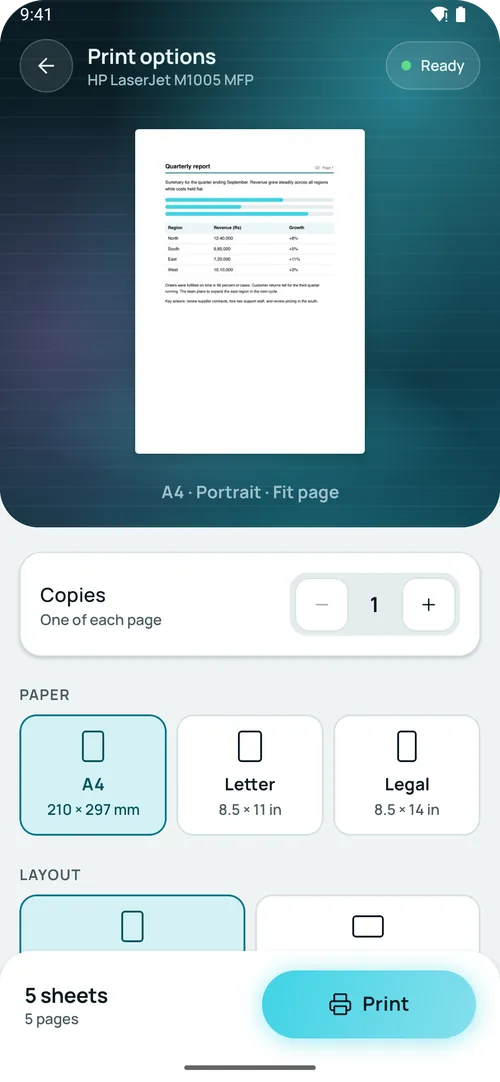
1-3, 7. - On the Options step, set copies, paper size (A4, Letter, Legal), portrait or landscape, fit (Fit page, Actual size, Fill paper) and margins (Normal, Narrow, None).
- Start the print. EazyPrint shows progress by sheet as pages are sent, and Cancel stops sending further pages. A Done screen appears at the end.
Which printers are tested?
The HP LaserJet M1005 MFP is the only model tested end to end on real hardware. EazyPrint also has experimental drivers for other HP LaserJet models, using the XQX and PCL 5 protocols. Experimental means the protocol is built but has not been tried on that model, so a page may come out wrong or not at all. See the full supported printers list.
Even on the M1005, three things are still waiting for a hardware check: two copies, landscape, and Odd/Even pages.
What it does not do
- EazyPrint is not on Google Play yet. Testers get a build by email.
- Only the HP LaserJet M1005 has been tested on real hardware. Every other model in the supported printers list is experimental: the protocol is built, but not tried on that model.
- It prints over a USB cable. There is no Wi-Fi or cloud printing.
- The options screen has no colour or two-sided setting. It offers copies, paper size, orientation, fit and margins.
- A printer that is not in the driver list is shown as not supported. EazyPrint does not guess a driver.
- The phone must support USB host (OTG). Without it, the printer cannot be seen.
How to get EazyPrint
EazyPrint is not on Google Play yet. To get early access, email srv021@gmail.com and say which printer you have.
Questions
Do I need Wi-Fi or a computer to print from my Android phone?
No. EazyPrint sends the pages over the USB cable. You only need the phone, an OTG cable and the printer.
Which USB printers work with EazyPrint?
The HP LaserJet M1005 is tested on real hardware. Some other HP LaserJet models are experimental. The supported printers page lists every model and its status.
What is an OTG cable?
An OTG (On-The-Go) cable or adapter lets a phone act as the host for a USB device such as a printer. It joins the phone’s port to a normal USB cable.
Can I print a Word or Excel file?
Yes. EazyPrint converts .docx, .xls and .xlsx files to a PDF on the phone, then prints the PDF. The layout is simplified, so check the page preview first.
Is EazyPrint on Google Play?
Not yet. Email for early access.