 EazyPrint
Print from your phone. No computer, no Wi-Fi.
EazyPrint sends your documents from an Android phone straight to a USB printer over an OTG cable. Nothing to install on a computer, no network to join.
- Works offline
- USB OTG
- No ads
- Tested on HP LaserJet M1005 MFP
- No computer
Your phone is the whole setup. Plug the printer into it and print.
- No Wi-Fi
A cable carries the job, so it works where there is no network.
- No cloud
Your file goes from your phone to the printer. It is not uploaded.
Plug in. Allow. Print.
Three steps, one cable. No pairing, no accounts, no network settings.
- 01
Plug in with an OTG cable
Connect the printer to your phone with a USB OTG cable or adapter. EazyPrint spots the printer the moment it is plugged in.
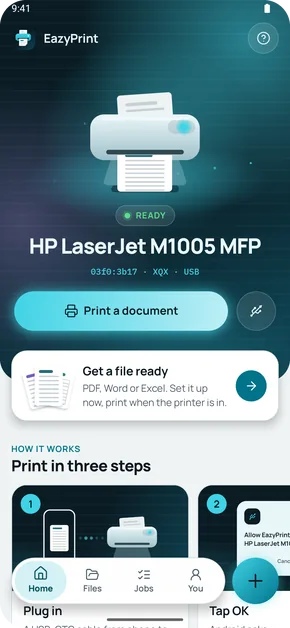
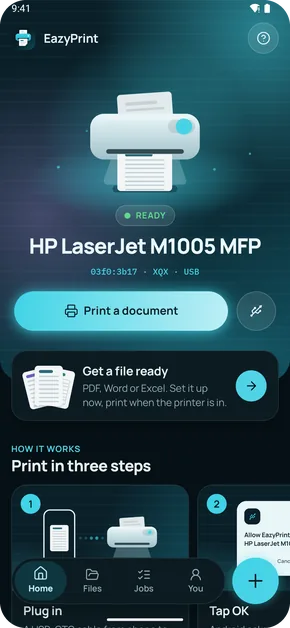
The Home screen when the printer is ready - 02
Allow USB access
Android asks once whether EazyPrint may use the printer. Say yes. EazyPrint never asks for access to a printer it has no driver for.
Illustration: Android asks for USB access - 03
Pick a file and print
Choose a PDF, Word or Excel file, or share one from another app. Pick pages and paper, then print. The app shows progress as pages are sent.
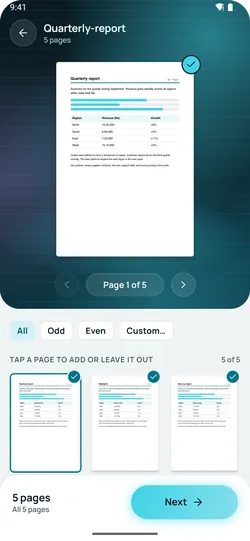
Pick the pages to print
Then the print screens
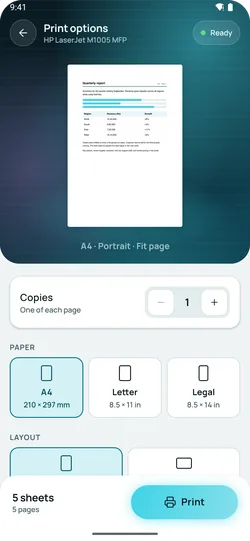
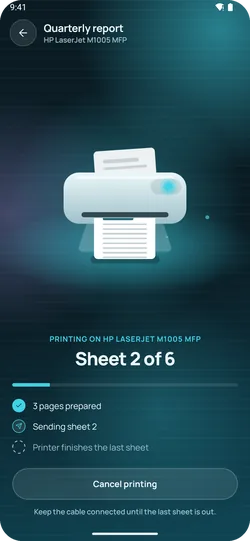
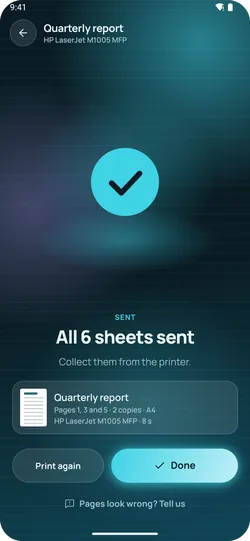
Screens from the app's built-in demo of a print job.
What the app does
Built around what the printer can actually do.
Sheet count while it prints
Shows "Sheet 4 of 6" as pages are sent to the printer.
Cancel while it prints
Cancel stops sending further pages to the printer.
Page thumbnails
A thumbnail of every page, with choices for all pages, odd, even or a custom range.
The options that work
Copies, A4, Letter or Legal, portrait or landscape, fit and margins. Only settings the app can apply.
Share from other apps
Send a PDF to EazyPrint from the Share menu or Open with in other apps.
Word and Excel, converted on the phone
Pick .docx, .xls or .xlsx. The app converts them to PDF on your phone, offline. Excel converts the first sheet only.
Recent files and job history
The app keeps a list of your recent files and of the jobs you ran.
Unknown printers are marked Not yet
A printer without a trusted driver is marked Not yet, and EazyPrint does not ask for access to it.
The new print screens (progress, Cancel, copies, landscape, Odd/Even, Word and Excel) are built and are going through checks on the M1005; the first tester build will say what has been confirmed.
One printer tested. The rest, said plainly.
EazyPrint ships a list of 89 USB printer IDs from four brands. Only some have a working driver, and only one has been tested on real hardware.
- 1
- Tested
- 11
- Experimental
- 77
- Not yet
- TestedHP LaserJet M1005 MFP (03f0:3b17). Printed end to end on real hardware.
- ExperimentalDriver built (PCL 5 or XQX), not yet tested on that model.
- Not yetNo working driver yet, so EazyPrint will not print to it.
Your documents stay on your phone
- Never uploaded. Printing is a direct USB stream from your phone to the printer.
- No ads. No ad networks in the app.
- Crash reports only. That is all the app sends, and never your files. Details are in the privacy policy.
Answers before you buy a cable
- Print from Android to a USB printerWhat you need, how the connection works, and what to do when the printer is not found.Read the guide
- HP LaserJet M1005 from AndroidThe one printer EazyPrint has been tested on, step by step.Read the guide
- Print a PDF from Android without Wi-FiUse an OTG cable and skip the network completely.Read the guide
- Print Word and Excel from Android offlineHow files are converted on your phone, and what to check first.Read the guide
Frequently asked
Is EazyPrint on Google Play?
Not yet. EazyPrint is in testing and is coming to Google Play. Email us to get early access.
Which printers does it work with?
The HP LaserJet M1005 MFP is tested on real hardware. Eleven more USB printer IDs use drivers that are built but not yet tested on that model, so they are experimental. The remaining listed IDs from HP, Canon, Samsung and Brother are marked Not yet, and EazyPrint will not print to them. See the full list.
Do I need Wi-Fi or a computer?
No. Your phone sends the document straight to the printer over a USB cable. There is no Wi-Fi, Bluetooth, cloud or computer in between.
What cable do I need?
Usually a USB OTG adapter or cable that fits your phone's port, plus the printer's own USB cable. Your phone must support USB host (OTG).
Does it work with Word and Excel files?
You can pick PDF, Word (.docx) and Excel (.xls and .xlsx) files. EazyPrint converts Word and Excel files to PDF on your phone, with no internet needed. Excel converts only the first sheet, and complex layouts can look different from Word or Excel, so check the page preview before you print. Word and Excel printing is still going through checks on the M1005, and PDF is the most reliable format.
Is my file uploaded anywhere?
No. Your files stay on your phone and go to the printer over USB. The app sends crash reports only, as described in the privacy policy.
Which Android versions are supported?
Android 6.0 or later, on a phone that supports USB host (OTG).
How do I get access?
EazyPrint is not on Google Play yet. Email us and we will send you early access.
Plug in. Print.
EazyPrint is coming to Google Play. Email us and we will send you early access.